

A camera that prints stickers is a handheld device that snaps a photo and instantly produces a peel-and-stick print, with no ink, no app, and no waiting. The industry term for these devices is “instant sticker camera,” though parents and gift buyers often search for them simply as sticker printing cameras. For children aged 5–12, the appeal is immediate: take a photo, press a button, and hold a real sticker seconds later. Thezoofamily designs kids’ cameras with exactly this kind of hands-on creativity in mind, combining fun features with a genuine commitment to nature. This guide covers how these cameras work, what to look for when buying one, and the best ways children can use them.
How does a camera that prints stickers work?
Instant sticker cameras use thermal printing technology to produce prints. Thermal printing works by applying heat to specially coated paper, which darkens in precise patterns to form an image. No ink cartridge is required. That makes the process clean, affordable, and genuinely child-friendly.
The key component is the paper itself. Thermal sticker paper is a specialised consumable, distinct from standard thermal paper. It has an adhesive backing that standard thermal paper lacks. Using the wrong paper type causes printer jams and produces prints with no sticky backing at all. Always buy paper rolls labelled specifically for your camera model.

The printing specs matter more than most parents realise. Typical models print at around 203 DPI with a speed of approximately 20 mm per second. That resolution produces clear, recognisable images rather than photographic-quality portraits, which is perfectly suited to children’s sticker use. Most cameras also feature a 12MP sensor and a 2.4-inch screen, so children can frame their shots before printing.
Battery life is a practical concern for gift buyers. Many children’s instant print cameras manage power efficiently enough to support multiple print sessions outdoors without constant USB charging. Some models support up to 400 continuous prints per charge. That is enough for a full birthday party or a long family day out.
Key technical features to understand at a glance:
- Printing method: thermal, no ink required
- Print resolution: approximately 200–203 DPI
- Screen size: typically 2.4 inches
- Battery: rechargeable lithium, often around 1000mAh
- Weight: roughly 175g, light enough for small hands
- Charging: USB or USB-C
Pro Tip: Buy thermal sticker paper in bulk from the camera’s own brand or a verified compatible supplier. Third-party paper that is not adhesive-backed will print fine but produce no stickers.
What creative features do these cameras offer children?
The best sticker printing cameras go well beyond a simple snap-and-print function. Many models include AI-powered sticker creation, voice-to-print commands, and up to 11 built-in filter effects. That range of options keeps children engaged long after the novelty of the first print wears off.
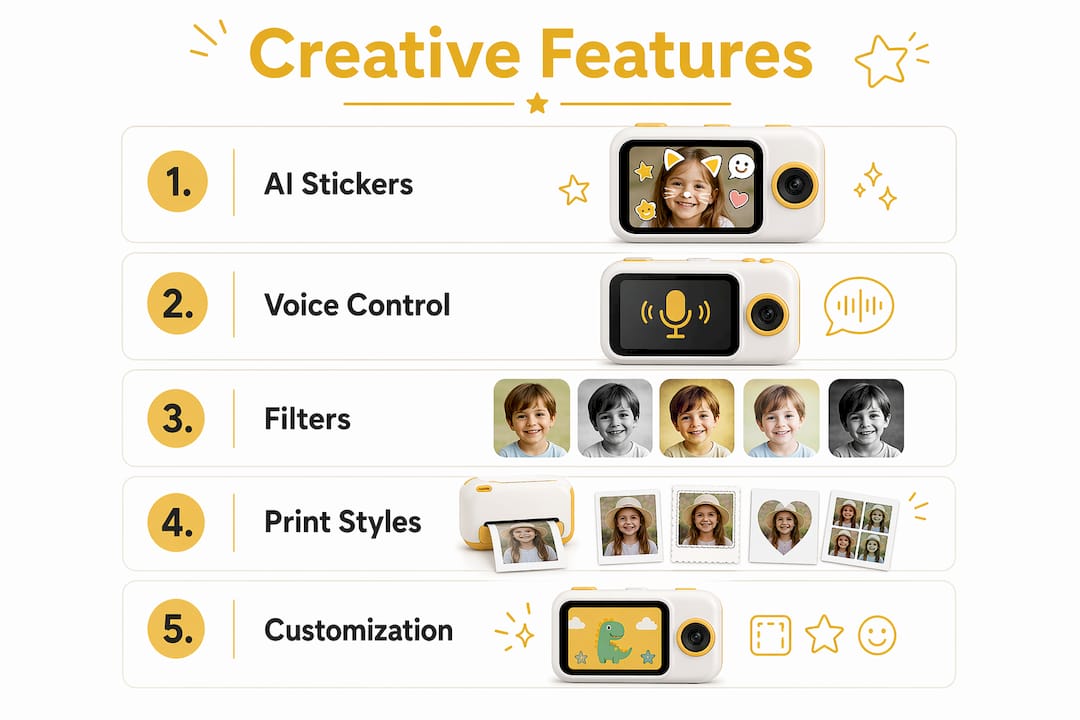
Voice-to-print is one of the more surprising features available. A child speaks a command or a short phrase, and the camera converts it into a printed label or note. AI-powered voice prompts and interactive chat features enhance imaginative play by letting children direct the camera rather than just operate it. For children aged 5–12, that sense of control is genuinely motivating.
Filters and printing styles add another layer of personalisation. Children can choose from options such as black-and-white, high-contrast, or soft-focus effects before printing. Up to 6 distinct printing styles are common across mid-range models, covering formats from standard square stickers to strip-style prints. Each style produces a different result from the same photo, which encourages children to experiment.
The developmental benefit here is real. Physical prints enhance engagement and reduce reliance on screens in a way that digital photo galleries simply cannot. A child who holds a sticker they made is more invested in it than one who scrolls past a thumbnail. That tactile connection is the core advantage of this category of camera.
Creative features ranked by child engagement:
- AI sticker creation — generates unique sticker designs from photos automatically
- Voice-to-print — lets children print labels by speaking, no typing required
- Filter effects — up to 11 options to personalise every shot before printing
- Multiple print styles — strip prints, square stickers, and framed formats
- Drawing and annotation tools — some models let children add doodles before printing
Pro Tip: Encourage children to use the filter effects before printing rather than after. Choosing a filter is a creative decision that builds visual thinking skills, and it uses no extra paper.
How to choose the best sticker printing camera for ages 5–12
The right camera depends on three practical factors: durability, paper compatibility, and ease of use. A camera that a seven-year-old cannot load or operate independently will sit unused within a week.
Start with the body. Children’s cameras built from ABS plastic are durable, lightweight, and safe for everyday handling. A size of around 90x80x40mm fits comfortably in a child’s hand without being too bulky for a school bag. Avoid models with sharp edges or small detachable parts, particularly for children under seven.
Paper compatibility is the most overlooked buying factor. Thermal sticker paper must be adhesive-backed and compatible with the specific printer to function correctly. Check whether replacement rolls are widely available and reasonably priced before committing to a model. A camera with expensive or hard-to-find paper becomes a frustrating gift within a month.
Key buying checklist for parents and gift buyers:
- Battery capacity: look for models supporting at least 200 prints per charge
- Paper availability: confirm replacement rolls are sold separately and in stock
- Weight: under 200g is the practical limit for children aged 5–8
- Screen size: 2.4 inches or larger makes framing shots much easier
- Charging port: USB-C is preferable for longevity and compatibility
- Drop resistance: check whether the manufacturer lists any drop-test rating
For a broader comparison of child-friendly options, the kids’ camera gift guide from Thezoofamily covers models with creative features including sticker printing, filters, and animal motifs suited to different age groups.
| Feature | What to look for |
|---|---|
| Print resolution | 200 DPI or above for clear stickers |
| Battery life | 200+ prints per charge for extended play |
| Body material | ABS plastic, no sharp edges |
| Paper type | Adhesive-backed thermal sticker rolls |
| Weight | Under 200g for comfortable handling |
Pro Tip: Buy one extra roll of thermal sticker paper with the camera as a gift. Running out of paper on the first day is the most common reason children lose interest quickly.
Creative ways to use a portable sticker printer with children
The sticker prints these cameras produce are far more versatile than most parents expect. Thermal printed stickers work for personalised labels, scrapbooking, arts and crafts, party decorations, and educational flashcards. Each of those uses turns a single camera into a multipurpose creative tool.
Journaling is one of the most popular uses among children aged 8–12. A child photographs something meaningful, prints it as a sticker, and places it directly into a notebook alongside handwritten notes. The result is a personal record that feels genuinely theirs. Parents report that sticker printing cameras extend children’s creativity into hands-on activities like journaling and crafts, reducing reliance on mobile devices in the process.
Practical activity ideas for families:
- Scrapbooking: print holiday and day-trip photos as stickers to build a physical memory book
- Personalised gifts: children can create custom sticker sheets as presents for friends and family
- Party activities: set up a sticker-printing station at birthday parties for instant party favours
- Learning cards: photograph objects, animals, or foods and print them as flashcard stickers for younger children
- Travel journals: print one sticker per destination to build a visual travel diary
- Pet portraits: photograph family pets and use the prints to decorate notebooks or bedroom doors
For craft project inspiration using instant prints, sticker craft supplies offer a wide range of complementary materials that pair well with thermal sticker prints. Combining printed stickers with decorative papers and washi tape produces results children are genuinely proud of.
The educational angle is worth taking seriously. A child who photographs a flower, prints it, and labels it with the plant’s name has engaged in observation, documentation, and recall. That is a learning sequence that no screen-based activity replicates in quite the same way.
Key takeaways
A camera that prints stickers is the most effective way to combine instant photography with tactile, screen-free creative play for children aged 5–12.
| Point | Details |
|---|---|
| Thermal printing needs no ink | Prints are clean, affordable, and mess-free, making them ideal for children. |
| Paper compatibility is critical | Always use adhesive-backed thermal sticker rolls matched to your specific camera model. |
| Creative features drive engagement | AI filters, voice-to-print, and multiple print styles keep children interested long-term. |
| Durability matters for young children | Choose ABS plastic bodies weighing under 200g for safe, comfortable daily use. |
| Sticker prints have many uses | From journaling to party favours, the prints extend creative play well beyond photography. |
Why sticker cameras matter more than parents think
I have watched children interact with a lot of cameras over the years, and the moment a child peels a sticker they just printed is genuinely different from anything a digital screen produces. There is a pause. They look at it. They decide where it goes. That sequence of decisions is the point.
The concern I hear most from parents is that these cameras are a novelty that fades. That is true of any toy that arrives without context. The cameras that hold children’s attention longest are the ones paired with a purpose: a journal to fill, a party to document, a pet to photograph repeatedly over months. The camera becomes a tool rather than a toy, and tools do not get boring in the same way.
The thermal printing format also matters more than the spec sheet suggests. Black-and-white prints with a slightly grainy texture look like something worth keeping. They feel different from a phone photo. Children treat them differently too. I have seen children aged six carefully arrange their sticker prints into handmade books with the same seriousness that older children bring to creative projects. That is not a small thing.
For parents worried about screen time, a sticker printing camera is one of the few genuinely screen-adjacent activities that pulls children away from passive consumption. The camera has a screen, but the goal is always the physical print. The screen is a means to an end, not the destination. That distinction changes how children engage with it entirely.
If you are buying for a child aged 5–8, prioritise simplicity and durability over features. For children aged 9–12, the AI and filter options become genuinely interesting creative tools. Match the camera to the child, not to the spec sheet.
— ALAIN
Thezoofamily’s picks for creative kids’ cameras
Thezoofamily builds kids’ cameras with creativity and nature in mind. Every camera sold plants one tree, so the fun your child has contributes to something real beyond the living room.
If you are looking for a child-friendly camera with creative features, Thezoofamily’s range covers options suited to different ages and interests. The camera features guide breaks down which features matter most for different age groups, from simple snap-and-print for younger children to AI-powered creative tools for older ones. For parents buying for very young children, the cameras for preschoolers guide covers safe, durable options designed for small hands and big imaginations. Every product in the Thezoofamily range is designed to get children off screens and into the world around them.
FAQ
What is a camera that prints stickers?
A camera that prints stickers is a compact, child-friendly device that takes photos and instantly produces peel-and-stick prints using thermal printing technology. No ink is required, and prints are ready within seconds.
What paper do sticker printing cameras use?
These cameras use adhesive-backed thermal sticker paper, which is a specialised consumable distinct from standard thermal paper. Using incompatible paper produces prints with no sticky backing and can cause printer jams.
Are instant sticker cameras suitable for children under seven?
Most models are suitable for children aged five and above, provided the body is made from durable ABS plastic with no sharp edges or small detachable parts. Always check the manufacturer’s recommended age range before buying.
How many prints can a child get per charge?
Battery capacity varies by model, but many children’s instant print cameras support up to 400 continuous prints per charge. That is sufficient for a full day of creative play without needing to recharge.
Can sticker prints be used for school projects?
Yes. Thermal sticker prints work well as flashcard labels, scrapbook elements, and visual notes for school projects. The prints are durable enough for notebooks and display boards when applied to a clean, dry surface.